
NATIVE KANBAN FOR MICROSOFT OUTLOOK
Your Inbox Is Your To-Do List.
Make It Look Like One.
Nothing to copy across, your mail never leaves your mailbox. Transform cluttered inbox threads into clear, visual workflows right inside Outlook.
No card needed · Instant 60-second setup · 100% Microsoft Graph secure
THE DISCIPLINE ILLUSION
You Tried Task Apps.
The Work Didn't Live There.
Every team leader assumes that falling behind on standalone boards is a failure of personal discipline. When project cards sit untouched in a separate browser tab, we blame our willpower, promise to develop better habits, and try yet another tool. It is not a discipline problem. It is a structural breakdown.
The exact moment you manually copy a request from an email into a third-party tracker, you create two conflicting realities. The card remains static. Meanwhile, the actual project continues moving in your inbox through thread replies, revised attachments, and scope shifts. Copies drift. Context rots. Within forty-eight hours, your task board becomes an obsolete graveyard of abandoned cards, because work arrives as mail.
Toggling back and forth thirty times a day to manually reconcile the state of your inbox with an external database isn't productivity: it is administrative friction. You didn't fail the software. The architecture failed you by demanding that you duplicate reality instead of organizing where you already work.
Mailtivity does not ask you to move anything. Your board is your mailbox.
WORKFLOW SIMPLICITY
How Mailtivity Works
Connect your existing mailbox in seconds. Every email behaves as an actionable task card with zero manual management overhead.
STEP 01
1. Every conversation becomes a card.
No tagging, no forwarding. Incoming threads convert directly into board cards with full history preserved.
STEP 02
2. Drag it to where it should be.
To Do, Doing, Pending. Drag effortlessly across stages to reflect real state instantly.
STEP 03
3. Reply from the card.
Thread is right there. Read context, write your response, and send directly from within the card.
Instant setup in Outlook. No credit card required.
OPERATIONAL SHIFT
What Changes About Your Day
Subtle background routines strip friction from standard triage, turning mental overhead into clear, predictable progression.
Stop Re-reading
Contextual notes stay attached to board cards, ending the repeated skim cycle each time a discussion thread reopens.
Visible Waiting
Delegated threads sit in a dedicated holding lane with automatic aging tags, preventing open loops from going cold.
Urgent Surfaces
High-impact inbound traffic bypasses static message lists to pin directly to top execution lanes with immediate visibility.
CCs Demoted
Informational courtesy copies isolate into quiet secondary sidebars, preventing passive mentions from congesting actionable tasks.
Threads Merged
Fractured side-replies collapse into a singular card timeline, displaying chronological progression without missing updates.
Auto-Archive
Dragging items to the resolved stage activates native Exchange archiving, keeping storage clean without manual sorting.
Learns Filing
Adaptive classification observes repeated destination habits, handling ongoing thread assignments automatically.
Board Follows You
Card position updates sync cleanly across web and desktop Outlook environments without secondary server latency.
ZERO-DATA-ACCESS ARCHITECTURE
Structural Privacy.
Not A Promise.
Most SaaS add-ins duplicate your messages into an external database, asking you to trust their legal terms. Mailtivity takes a fundamentally different engineering path: we do not possess a database capable of receiving your mail.
Your Kanban columns, custom tags, and card rankings are compiled client-side in your local browser runtime. They are saved directly into a dedicated hidden folder inside your existing Microsoft Exchange mailbox. Your sensitive communications never touch, relay through, or cache on Mailtivity infrastructure.
- Client-Side State Engine: Board arrangements compile in your browser memory.
- Native Exchange Storage: Layout states persist inside your hidden mailbox directory.
- Zero External Telemetry: Message bodies, subjects, and attachments remain strictly in O365.
RAW VERIFICATION
A Real Board From A Real Mailbox
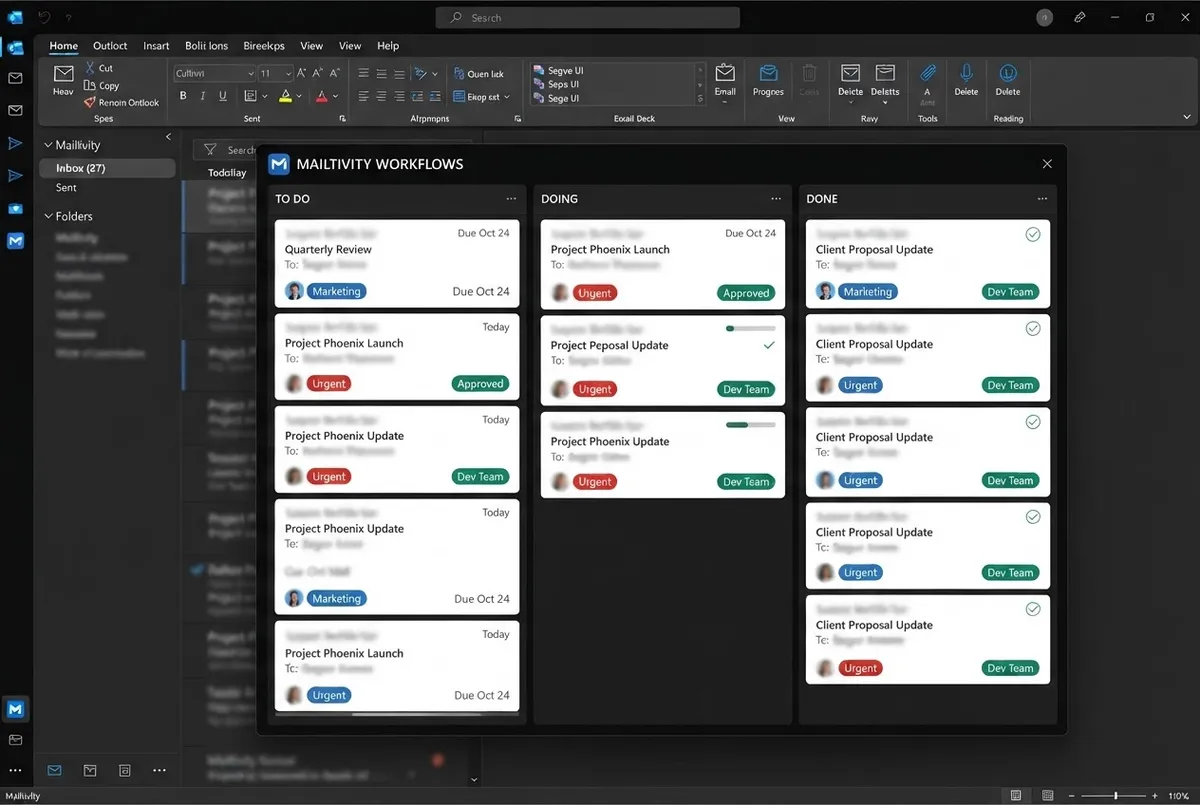
A working board. Names blurred, nothing else changed.
SETUP TRANSPARENCY
Five Minutes To Install
We will not pretend this is a magic one-click app store extension. Microsoft makes you install add-ins by hand through Outlook's web manifest manager. It takes about 300 seconds, involves opening a preferences panel, and requires restarting your desktop client once.
Using a Managed Corporate Inbox?
Enterprise IT policies often block sideloading add-ins. If the 'Custom Add-ins' button is grayed out, send this exact 2-sentence note to your systems administrator:
Download Manifest XML
30 secondsSave the small 14KB verification XML manifest from your account portal. This file contains no code - just connection pointers to Outlook's web components.
Load in Outlook Web Settings
90 secondsNavigate to Outlook Web > Settings > Manage Add-ins > 'My Add-ins'. Scroll down to 'Add a custom add-in' and select 'Add from File'.
Restart Outlook Desktop Crucial Step
60 secondsClose Outlook completely (check System Tray / Task Manager). Reopen it so Microsoft Office can pull down the synced manifest token.
Pin Mailtivity to Toolbar
30 secondsClick the new Mailtivity Kanban icon in your top action ribbon, click the pin symbol, and sign in directly via your existing Microsoft SSO account.
TRANSPARENCY FIRST
What It Doesn't Do Yet
We'd rather tell you now. Mailtivity is intentionally engineered for high-velocity personal email triage. To protect privacy and prevent speed degradation, we made deliberate architectural choices about what we do not touch.
No sales spin, no hidden roadblocks. If these three parameters break your daily workflow, we advise holding off until our future updates.
-
Not Yet
Inbox only for now (no multi-folder)
Mailtivity reads and maps messages in your active primary Inbox. Emails automatically sorted into secondary folders or nested archive trees do not reflect onto your board columns.
-
Not Yet
Reminders show in board, no pop-ups
Time markers and due dates appear cleanly on Kanban cards within your interface. We do not spawn disruptive desktop notification alerts, dock badges, or audio chimes.
-
Not Yet
One mailbox per board (no shared/delegate)
Each workspace coordinates with one authenticated Microsoft account. Shared departmental inboxes (e.g. sales@ or help@) and delegated executive mailboxes are not currently supported.
TRANSPARENT PRICING
Simple Pricing
$8 per person, per month. One seat, one mailbox, every feature. No tiers, no feature gates.
Or $76.80 for a year : you save $19.20 per seat.
- Direct client-side sync with your existing Microsoft 365 inbox
- Kanban board views, tag management, and daily focus tracking
- Flexible team seat management: add, reassign, or remove anytime
- Fair prorated adjustments applied automatically to your balance
Scale effortlessly across your team with no minimum seat requirements and no arbitrary lock-in contracts.
FULL ACCESS
$8 / seat / mo
Annual billing option: $76.80/year (Save $19.20 per seat)
- 14-day comprehensive trial included
- Zero feature gates or restricted boards
- No credit card required to begin
- No automatic charge when trial concludes
No card, no auto-charge at the end.
RADICAL TRANSPARENCY
Questions People Actually Ask
No sales spin or marketing evasion. Direct answers to how your data is handled, system compatibility, licensing flexibility, and mailbox safety.
Need clarification on security clearance or enterprise MS 365 tenant deployment? Reach our engineering team directly at [email protected].
Which versions of Microsoft Outlook are fully supported?
Mailtivity integrates with Outlook on the Web (Office 365 in Edge, Chrome, Safari, and Firefox), the modern Outlook for Windows desktop client, and Outlook for Mac (version 16.65 or newer). It functions via the official Microsoft 365 modern add-in architecture without requiring third-party DLLs or elevated local admin rights.
Does Mailtivity read, store, or index my email messages?
No. Your email payload data remains strictly inside Microsoft Exchange. Mailtivity runs locally in your authenticated session and talks directly to the Microsoft Graph API. We never replicate, inspect, or store your message bodies, attachments, or contact directories on external servers.
What happens to my board and categories if I cancel my subscription?
Your organizational structure remains 100% intact. Mailtivity writes standard Exchange categories and folder tags directly to your mailbox. If you pause or cancel, your emails remain tagged, grouped, and visible inside default Outlook views exactly where you placed them.
Does Mailtivity modify or reorganize my actual mailbox folders?
Only when you explicitly instruct it to. Moving a card across board columns can either apply a standard colored category or file the thread into a designated Outlook folder - based entirely on the automation rules you define in your board preferences.
Can I use Mailtivity as an individual, or does my whole team need it?
Solo professionals can use Mailtivity independently right out of the box. You do not need tenant-wide deployment or company-wide adoption. If teammates later decide to join, you can seamlessly invite them to collaborate on shared shared-mailbox boards.
How are seats added, reassigned, or removed across an organization?
Account owners manage licenses via a self-serve billing console. You can provision or revoke seats at any time with a single click. When an employee departs, their seat can be instantly reassigned to a replacement without losing existing board templates.
What is your refund policy if the tool does not fit my workflow?
We provide a no-questions-asked 14-day refund window on all initial purchases. If Mailtivity does not noticeably clean up your inbox triage within the first two weeks, notify our support desk for an immediate, full refund.
What does customer support look like and how fast do you reply?
Every tier includes direct technical support handled by engineers who build the product. Email tickets are addressed within 4 business hours, accompanied by step-by-step setup walkthroughs and screen-share assistance if tenant permissions require troubleshooting.
ZERO RISK • INSTANT EVALUATION
Try It On Your Own Inbox
For two weeks. No card. No commitment. If it doesn't fit how you work, you'll know in a day.
Direct Microsoft 365 OAuth • No credit card required • 60-second setup
Turn your Outlook inbox into a focused visual Kanban board without exposing your mailbox data to third-party cloud servers.
Enterprise-grade privacy with direct browser-to-Microsoft architecture.
Guides & Pricing
Legal & Compliance
Support
1 working day response time
© 2026 Mailtivity. All rights reserved. Microsoft Outlook and Office 365 are registered trademarks of Microsoft Corporation.